
Download Link
PushToSky Desktop
- PushToSky_1.0-Linux
- PushToSky_1.0-Windows
- GPS Sender for Push to Sky
- Telescope Motion Sender for Push to Sky
Release Notes
Push_to_Sky_1.0
- Direction Indicator
- One-Star Alignment
- Manual Tuning/Slew
- Tracking: Bright Stars, Deep-Sky Objects, Solar System Planets
- Stellarium control via API
- Linux, Windows
PushToSky Android
Release Notes
PushToSky_1.0-Android
- Direction Indicator
- One-Star Alignment
- Tracking: Bright Stars, Deep-Sky Objects, Solar System Planets
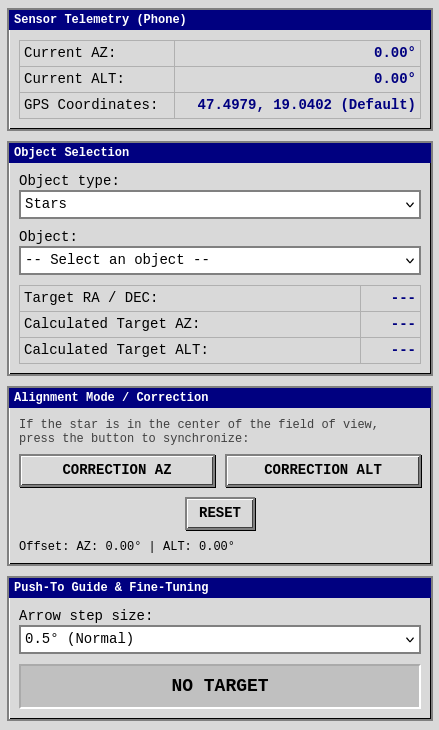
How to Use:
Getting Started:
1. Install the PushToSky-Android.apk application on your phone.
2. Mount the phone onto the telescope.
3. Launch the PushToSky-Android application.
One-Star Alignment:
Please begin the one-star alignment procedure.
1. Point the telescope at a bright star (e.g., Arcturus).
2. In the "Object Selection" section, select Arcturus.
3. Press the "ALT Correction" button.
4. Without changing the telescope's direction, move the optical tube to a position close to 0° (horizontal), then press the "AZ Correction" button.
(If an error occurs, press the "Reset" button and restart the procedure from the beginning.)
Pointing to a Target:
In the "Object Selection" section, select the desired target object (make sure the telescope is in a position close to 0° (horizontal) when selecting the target object), then follow the directional arrows.